Wildlife Weather
- 4.7
- Rating
- 10.00K
- Installs
- Free
- Price

 Analysis by App-foxy
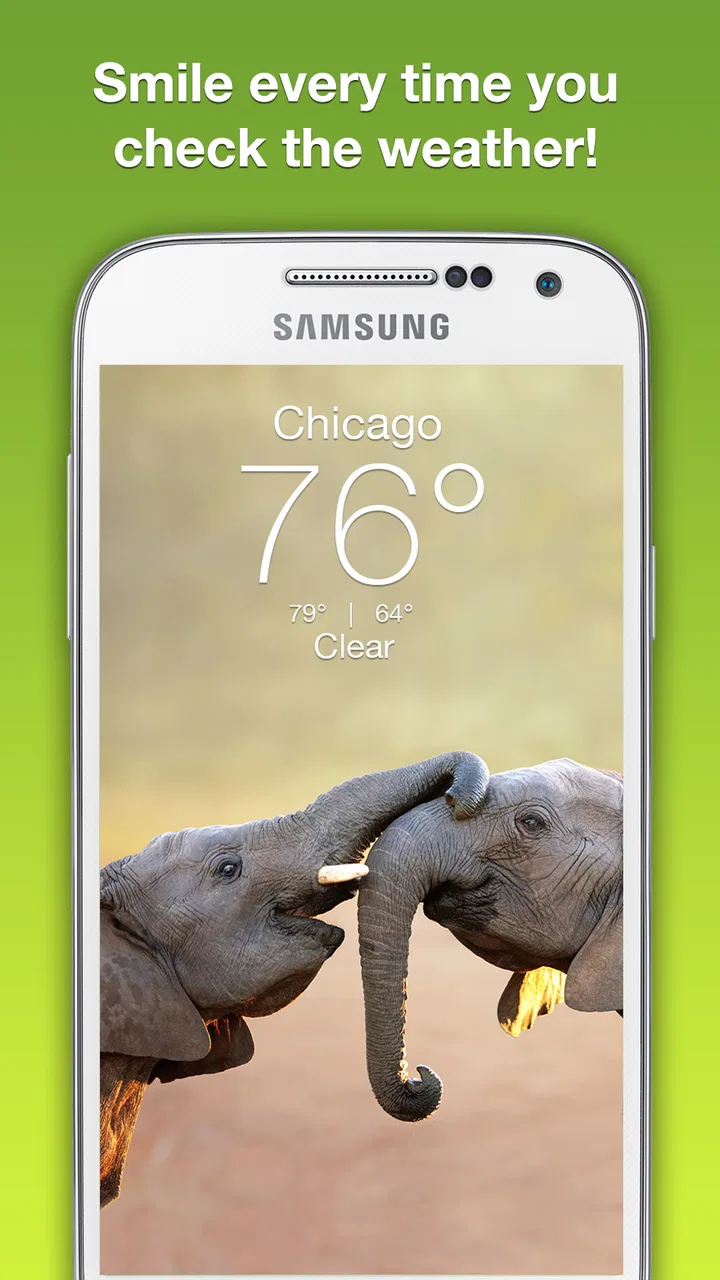
Wildlife Weather takes a simple daily task and gives it a more visual, calmer personality. Instead of treating the forecast as a wall of numbers, it places weather checking alongside photography from the animal kingdom. I found that combination appealing when I wanted a quick reason to open a weather app without feeling as if I were staring at another utility screen. It is a free weather app from Weather Creative Inc., aimed at Teen users, and its strongest quality is the atmosphere it creates around a familiar routine.
That visual identity also sets the right expectation. This is not the kind of tool I would choose when I need a professional meteorological dashboard, detailed radar interpretation, or a long-range planning workspace. I see it as a lightweight companion for everyday decisions: whether to take a jacket, when to walk the dog, or whether an outdoor plan deserves a second look. The app has been available since Jul 5, 2016, and its current version is 6.2.7, so it feels like an established product rather than a brand-new experiment.
How Wildlife Weather feels during everyday use
My first impression is that the app is designed to make the act of checking the weather feel less mechanical. The wildlife photography gives the interface a distinctive emotional hook, while the forecast remains the practical reason to return. That balance matters because a weather app needs to be useful in a few seconds. If the presentation gets in the way of the forecast, the novelty wears thin; if the presentation is too plain, there is little here to separate it from the default app already installed on a phone.
You May Also Like

 Pandora - Music & Podcasts
Pandora’s Music Is Easy to Start, but Harder to Recover
Pandora’s strength is its low-effort path from a seed to a station. Its weak spot is how much confidence it asks you to place in connection, setup, and quiet recovery.

 AccuWeather: Weather Radar
AccuWeather Review: A Quick, Clear Forecast for Everyday Decisions
For everyday plans, the best forecast is the one you can understand quickly. AccuWeather makes rain timing, radar, and local conditions easy to act on, with a few trade-offs.

 Hill Climb Racing
Why Hill Climb Racing Still Turns Crashes Into One More Run
A tiny car, a bumpy hill and one more upgrade: Hill Climb Racing keeps resurfacing because its simple chaos makes every near-miss feel personal.

 AliExpress - Shopping App
AliExpress Makes Global Shopping Feel Personal, but Shoppers Bear the Risk
AliExpress turns a global marketplace into a pocket-sized discovery engine. Its reach is useful, its shopping loop compelling, and its trade-offs easy to miss.

 Lords Mobile: Kingdom Wars
Lords Mobile Is a Kingdom-Building Routine, Not a Quick Match
A case-by-case verdict on the building, battles, device demands, and social commitments that make Lords Mobile rewarding for some players and exhausting for others.

 PDF Scanner app - TapScanner
TapScanner Makes Paperwork Easier to Capture, Check, and Share
TapScanner makes scanning with a phone feel less like a rescue operation and more like a dependable step in getting work done. Its capture tools are useful, though not flawless.
More From Our News Desk
View All News


In normal use, I would open it before leaving home, glance at the current conditions, and decide whether the day calls for a coat, umbrella, or lighter clothing. The app makes the most sense in that quick-check role. I would not expect to spend long sessions browsing it, and I do not think it needs to encourage that. Its appeal comes from making repeated short visits pleasant rather than turning weather into a research project.
The photography is more than a decorative detail because it changes how the app competes with ordinary alternatives. A built-in weather app usually wins on familiarity and speed: it is already on the phone, and I know where to find the forecast. Wildlife Weather answers that advantage with personality. If I enjoy nature imagery, the extra visual character can make it the app I choose voluntarily instead of the one I use only because it is convenient.
That choice is personal, though. Someone who wants the smallest possible interface may see the imagery as unnecessary. I can also imagine a user who checks weather many times throughout a busy day preferring a more information-dense tool. Wildlife Weather works best when the visual experience adds value rather than when every second and every screen element must be optimized for technical detail.
Speed expectations and the cost of a quick check
For a weather app, perceived speed is not just about how quickly a screen appears. It is also about how quickly I can understand what I am seeing. Wildlife Weather benefits from having a clear purpose: open it, take in the current weather, and move on. The uncluttered concept helps keep that interaction mentally light, even when I am checking it while getting ready for work or standing near the front door.
There is a useful distinction between a fast glance and a complete forecast review. A simple check should feel natural here, but anyone expecting layered maps, multiple technical views, or extensive planning tools may find the experience less immediate because the app is not built around that kind of depth. In other words, its speed advantage comes from focus, not from offering every possible weather detail at once.
My practical tip is to decide what you need before opening it. If the question is “What should I wear?” or “Is a short walk sensible?”, this style of app is a good fit. If the question is “How will conditions change hour by hour during a long drive?”, I would use a more specialized alternative. That small distinction prevents disappointment and makes the app feel faster because I am asking it to do the job it appears designed to do.
The app’s free entry point also makes that experiment easy. I can try it as a replacement for my usual weather shortcut without committing money first. There are in-app purchases ranging from $1.99 to $29.99 per item, so I would pay attention to any optional purchase screen and decide whether the added value matches my habits. For a casual user, the free experience is the sensible place to begin rather than assuming that every available extra is necessary.
What happens during heavier use
Heavy use for a weather app does not usually mean playing for hours. It means opening it repeatedly during a changing day, checking before several trips, or returning to it while an outdoor event is approaching. Wildlife Weather is better suited to a series of brief visits than to a long analytical session. The photography gives those visits a pleasant rhythm, but the app’s value still depends on how directly the forecast answers the immediate question.
A realistic example would be a Saturday when I plan to walk through a park, meet a friend for lunch, and travel home later. I would check the app in the morning, look again before leaving the house, and make one more decision before the return trip. For that routine, the visual presentation is a nice touch: each check feels less like opening a spreadsheet and more like a small pause. But if the day involves an outdoor event where conditions could change quickly, I would pair it with a more detailed weather source rather than rely on a single lightweight app.
This is one of the app’s important trade-offs. It can make weather checking more inviting, but it does not automatically make weather information more complete. The animal images may encourage me to open the app more often, which is useful when I remember to reassess plans. At the same time, frequent checking can expose the limits of a simpler interface if I need precise comparisons, detailed timelines, or specialist information.
Resource demands are also worth considering in this context. Photography is naturally more visually rich than a plain text forecast, so users with limited storage, older hardware, or strict data habits may prefer a minimalist weather tool. I would not describe Wildlife Weather as the obvious choice for someone trying to reduce every visual or network burden. Its identity depends partly on presentation, and that presentation is the reason to choose it over a bare forecast screen.
For that reason, I would avoid treating it as a replacement for every other weather service on a phone. I would use it as the friendly daily option and keep a more technical source available for travel, hiking, severe conditions, or decisions where detail matters more than charm. That two-app workflow sounds excessive for a simple forecast, but it is actually practical: one app handles routine awareness, while the other handles situations that deserve closer inspection.
Reliability, stability, and returning after interruptions
A reliable weather app should make me feel confident that I can open it when I need it, understand the screen without relearning the layout, and get back to my day. Wildlife Weather’s long presence in the app ecosystem and its current version suggest ongoing maintenance, which is reassuring for a utility I might use repeatedly. Its average rating is 4.7 from around 1.4 thousand ratings, a strong reception that supports the impression that the concept works for many users.
I still separate popularity from personal reliability. A high rating cannot tell me how the app will behave on every device, network, or operating system. The minimum requirement is Android 7.0, which gives it a broad compatibility range, but older phones can differ greatly in memory, storage speed, and display performance. A user with an aging device should judge it by actual responsiveness rather than assume that a compatible operating system guarantees an identical experience.
Recovery matters in ordinary life. I may open a weather app while switching between messages, music, maps, and a calendar. If I leave it briefly and return, I want to regain the same task quickly instead of feeling lost. Wildlife Weather’s focused purpose works in its favor here: there are fewer reasons to wander away from the forecast. Still, I would not make strong claims about background behavior or recovery on every handset, because those experiences can depend on the phone itself and on how the operating system manages apps.
My advice is simple: after installing it, test the exact routine you care about. Open it from a cold start, leave it while doing something else, and return before an actual trip. Try the same thing on both a strong connection and the kind of connection you normally have outdoors. That gives a much more useful answer than a generic promise about stability, especially if you use an older Android phone or regularly move between Wi-Fi and mobile data.
The app’s content rating is Teen, which is worth noting for households that use device-level controls. The wildlife focus sounds broadly approachable, but the formal rating is still part of the installation decision. Parents should check how that rating fits their own settings rather than assuming that a nature-themed presentation automatically places the app in a child-specific category.
Device limits and the right kind of user
Wildlife Weather is a good candidate for people who want a weather routine with more visual warmth. I would recommend it to someone who enjoys animal photography, checks conditions before commuting or walking, and prefers a calm interface over a technical wall of information. It can also suit a person who finds the default weather app dull and wants a small change without paying upfront.
I would be more cautious about recommending it to professional outdoor workers, serious hikers, travelers planning around changing conditions, or anyone who needs weather information presented with maximum precision and context. Those users may be better served by an app built around radar, alerts, detailed hourly changes, or specialized forecasting tools. Wildlife Weather’s appeal is not that it replaces all of them; it is that it makes the ordinary forecast feel more enjoyable.
There is also a difference between liking nature imagery and wanting it every time you check the weather. At first, the photography can make the app memorable. Over time, the deciding factor becomes whether the forecast workflow remains convenient. If I only want a tiny glance at the temperature and conditions, my phone’s built-in option may still be faster simply because it is already part of my routine. Wildlife Weather earns its place when its atmosphere matters enough to outweigh that convenience.
On an older device, I would keep expectations modest. Android 7.0 support is helpful, but it does not turn an older handset into a modern one. A smaller screen may also make visual content feel less comfortable than it does on a larger display. I would avoid installing it when storage is extremely tight or when I am deliberately choosing only the most stripped-down utilities. The app is free to try, but free does not mean costless in terms of space, attention, or optional purchase decisions.
One useful workflow is to make it the first weather check of the day, then use a specialist service only when the situation becomes more demanding. For example, I might use Wildlife Weather before leaving for work, but switch to a more detailed alternative before a long cycling trip. This keeps the pleasant daily habit without pretending that one interface is ideal for every type of forecast research.
How it compares with ordinary weather alternatives
The default weather app on a phone has an obvious advantage: minimal effort. It is familiar, usually close at hand, and designed around quick access. Wildlife Weather competes by offering a more distinctive mood. I would choose the default option when I am rushing or when I need information I already know how to find there. I would choose this app when I want the weather check to feel less repetitive.
Compared with a full-featured forecasting service, the difference is even clearer. A specialist weather app is generally the better choice for detailed planning because its whole purpose is to expose more layers of information. Wildlife Weather is more approachable for routine awareness, but I would not ask it to carry the responsibility of a complex outdoor decision by itself. The best option depends on whether the priority is emotional ease or analytical depth.
It also differs from a simple widget. A widget can be unbeatable for a glance because it removes the need to launch anything. Wildlife Weather has to justify the extra step by making the visit pleasant and visually rewarding. If I never care about the photography, that extra step may not be worthwhile. If I do care, the app offers a small moment of interest that a plain widget cannot provide.
The purchase range is another reason to compare carefully. Since the app is free but includes optional items from $1.99 to $29.99, I would not assume that every user gets the same value from it. Someone who wants only a straightforward weather check may be perfectly satisfied without spending more. Someone attracted to the fuller visual experience should inspect what an optional purchase changes before paying, and should treat the free version as the baseline for judging whether the app belongs in a daily routine.
My performance verdict after living with the concept
Wildlife Weather succeeds because it understands that utility does not have to feel sterile. The animal photography gives a routine forecast a recognizable identity, and the focused purpose makes short visits easy to understand. I like it most as a morning and before-leaving-the-house companion, especially for people who appreciate nature imagery and do not need a professional forecasting workstation.
Its limitations are just as important. The visual approach may be less appealing to users who want the leanest possible interface, and the app should not be treated as a universal replacement for detailed weather tools. Heavy checking, older hardware, limited storage, and demanding outdoor plans can all make a more specialized alternative the wiser choice. Optional in-app purchases also mean I would review the value carefully instead of assuming that paying is required for a satisfying basic experience.
Weather Creative Inc. has built something more memorable than a generic forecast screen, and the reception from around 1.4 thousand ratings reflects that the idea connects with users. I would recommend trying it if you want a free, visually distinctive way to check everyday conditions and you are comfortable keeping a second app for advanced planning. My honest recommendation is to choose it for atmosphere plus routine usefulness, not for maximum meteorological depth.
After using it in that role, I see Wildlife Weather as a pleasant specialist rather than an all-purpose authority. It earns a place on my phone when I want a forecast that feels inviting, loads into a familiar habit, and gives me a small connection to the animal world. If your priority is speed through the fewest possible taps or detailed weather analysis, another option will probably serve you better. For a friendly daily check with a distinctive visual character, however, this app is easy to understand and worth trying at no upfront cost.
FAQs for Wildlife Weather
01What is Wildlife Weather, and what does it do?
Wildlife Weather is a weather-focused app designed for people who spend time outdoors, including hikers, campers, birdwatchers, photographers, and wildlife enthusiasts. It presents current conditions and forecasts in a practical format, helping you understand temperature, rain, wind, visibility, and other factors that may affect outdoor plans. Its usefulness depends on the location data and forecast coverage available in your region.
02Is Wildlife Weather useful for planning outdoor activities and wildlife observation?
Yes, Wildlife Weather can be useful when preparing for activities such as hiking, camping, nature walks, fishing, or wildlife photography. Checking the forecast before leaving may help you choose suitable clothing, equipment, and travel times. Weather can change quickly, especially in remote areas, so the app should be treated as a planning aid rather than a replacement for local warnings, official alerts, maps, or personal safety judgment.
03Does Wildlife Weather require an internet connection or location permission?
The app may require an internet connection to download updated forecasts, weather observations, maps, or related information. Location permission can also be useful if you want automatic weather data for your current position. You may be able to search for places manually instead, depending on the version and platform. Before granting access, review the permission request and privacy information to understand how location data is handled.
04Is Wildlife Weather free to download, or does it include paid features?
Wildlife Weather’s availability and pricing can vary between Android and iOS, as well as between different app versions. Some features may be available without payment, while advanced tools, additional forecast information, advertising removal, or subscriptions could require a purchase. Check the app-store listing before downloading and review any in-app purchase details carefully, particularly if the app offers a free trial that later renews automatically.
05Can Wildlife Weather be relied on for severe weather or wilderness safety?
Wildlife Weather may provide helpful forecasts, but it should not be your only source for severe-weather decisions or wilderness safety. Forecast accuracy can decrease in mountains, forests, coastal areas, and locations with limited weather stations. Always compare the information with official meteorological services, emergency alerts, park notices, and local guidance. Carry appropriate safety equipment and avoid entering dangerous conditions based solely on an app forecast.
Pros
- Clear forecasts tailored to wildlife and outdoor conditions.
- Helpful weather details for planning hikes
- camping
- and nature trips.
- Simple interface makes key information quick to find.
- Useful alerts can help users prepare for changing conditions.
- Supports better awareness of conditions in remote natural areas.
Cons
- Some features may depend on reliable location and internet access.
- Forecast accuracy can vary in remote regions with limited weather data.
- Wildlife-specific information may be limited in certain locations.
- Frequent alerts could become distracting if settings are not adjusted.
- Battery usage may increase when location tracking is enabled.

Wildlife Weather
Gallery